
阿里云SSL证书服务支持下载证书安装到Jetty服务器,从而使Jetty服务器支持HTTPS安全访问。本文介绍了证书安装的具体操作。
1、Jetty服务器版本确认。建议使用Jetty 9.2.22及以上版本。
2、从阿里云下载tomcat格式的证书。非系统生成的CSR需要生成pfx证书密匙对文件,转换命令如下。
openssl pkcs12 -export -out 214362464370691.pfx -inkey 214362464370691.key -in 214362464370691.pem
3、转换pfx的证书密匙对文件为jks格式,转换命令如下:
说明 Windows环境注意在%JAVA_HOME%/jdk/bin目录中执行。
keytool -importkeystore -srckeystore 密匙对文件.pfx -destkeystore 证书名称.jks -srcstoretype PKCS12 -deststoretype JKS
回车后输入两次要设置的jks格式证书密码,然后输入一次pfx证书密码。三次密码必须输入pfx-password.txt记录的密码。jks密码与pfx证书密码相同,否则可能会导致Jetty服务器启动失败。
4、配置Jetty的SSL。
1)确保Jetty的http页面可正常访问。
2)拷贝证书。进入Jetty服务器目录下的etc,新建存放jks格式证书的目录,并复制jks格式证书至当前目录。
# pwd /opt/jetty9222/etc # mkdir cert # cd cert/ # cp ../../../keys/jetty.jks . # ls jetty.jks
3)编辑Jetty服务器目录下etc中的jetty-ssl.xml文件,设置证书相关参数(密码设置为pfx-password.txt中记录的所有密码)。
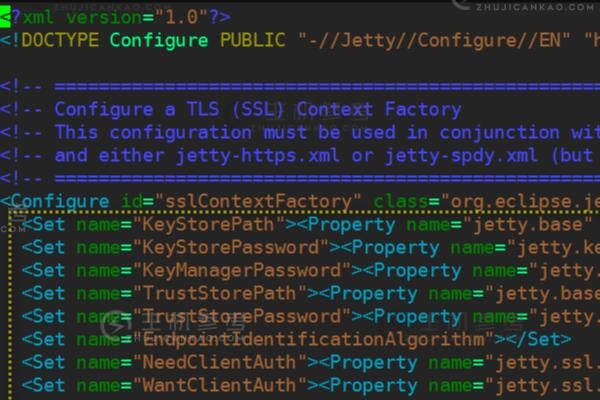
<?xml version="1.0"?> <!DOCTYPE Configure PUBLIC "-//Jetty//Configure//EN" "http://www.eclipse.org/jetty/configure_9_0.dtd"> <!-- ============================================================= --> <!-- Configure a TLS (SSL) Context Factory --> <!-- This configuration must be used in conjunction with jetty.xml --> <!-- and either jetty-https.xml or jetty-spdy.xml (but not both) --> <!-- ============================================================= --> <Configure id="sslContextFactory" class="org.eclipse.jetty.util.ssl.SslContextFactory"> <Set name="KeyStorePath"><Property name="jetty.base" default="." />/<Property name="jetty.keystore" default="etc/cert/jetty.jks"/></Set> <Set name="KeyStorePassword"><Property name="jetty.keystore.password" default="214362464370691"/></Set> <?xml version="1.0"?> <!DOCTYPE Configure PUBLIC "-//Jetty//Configure//EN" "http://www.eclipse.org/jetty/configure_9_0.dtd"> <!-- ============================================================= --> <!-- Configure a TLS (SSL) Context Factory --> <!-- This configuration must be used in conjunction with jetty.xml --> <!-- and either jetty-https.xml or jetty-spdy.xml (but not both) --> <!-- ============================================================= --> <Configure id="sslContextFactory" class="org.eclipse.jetty.util.ssl.SslContextFactory"> <Set name="KeyStorePath"><Property name="jetty.base" default="." />/<Property name="jetty.keystore" default="etc/cert/jetty.jks"/></Set> <Set name="KeyStorePassword"><Property name="jetty.keystore.password" default="214362464370691"/></Set> <Set name="KeyManagerPassword"><Property name="jetty.keymanager.password" default="214362464370691"/></Set> <Set name="TrustStorePath"><Property name="jetty.base" default="." />/<Property name="jetty.truststore" default="etc/cert/jetty.jks"/></Set> <Set name="TrustStorePassword"><Property name="jetty.truststore.password" default="214362464370691"/></Set> <Set name="EndpointIdentificationAlgorithm"></Set> <Set name="NeedClientAuth"><Property name="jetty.ssl.needClientAuth" default="false"/></Set> <Set name="WantClientAuth"><Property name="jetty.ssl.wantClientAuth" default="false"/></Set> <Set name="ExcludeCipherSuites"> <Array type="String"> <Item>SSL_RSA_WITH_DES_CBC_SHA</Item> <Item>SSL_DHE_RSA_WITH_DES_CBC_SHA</Item> <Item>SSL_DHE_DSS_WITH_DES_CBC_SHA</Item> <Item>SSL_RSA_EXPORT_WITH_RC4_40_MD5</Item> <Item>SSL_RSA_EXPORT_WITH_DES40_CBC_SHA</Item> <Item>SSL_DHE_RSA_EXPORT_WITH_DES40_CBC_SHA</Item> <Item>SSL_DHE_DSS_EXPORT_WITH_DES40_CBC_SHA</Item> </Array> </Set> <!-- =========================================================== --> <!-- Create a TLS specific HttpConfiguration based on the --> <!-- common HttpConfiguration defined in jetty.xml --> <!-- Add a SecureRequestCustomizer to extract certificate and --> <!-- session information --> <!-- =========================================================== --> <New id="sslHttpConfig" class="org.eclipse.jetty.server.HttpConfiguration"> <Arg><Ref refid="httpConfig"/></Arg> <Call name="addCustomizer"> <Arg><New class="org.eclipse.jetty.server.SecureRequestCustomizer"/></Arg> </Call> </New> </Configure>
4)编辑Jetty服务器目录中的etc中的jetty-https.xml文件,配置https所使用的443端口。
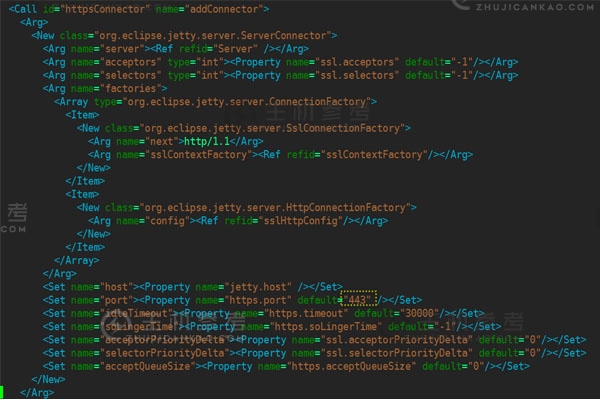
<?xml version="1.0"?> <!DOCTYPE Configure PUBLIC "-//Jetty//Configure//EN" "http://www.eclipse.org/jetty/configure_9_0.dtd"> <!-- ============================================================= --> <!-- Configure a HTTPS connector. --> <!-- This configuration must be used in conjunction with jetty.xml --> <!-- and jetty-ssl.xml. --> <!-- ============================================================= --> <Configure id="Server" class="org.eclipse.jetty.server.Server"> <!-- =========================================================== --> <!-- Add a HTTPS Connector. --> <!-- Configure an o.e.j.server.ServerConnector with connection --> <!-- factories for TLS (aka SSL) and HTTP to provide HTTPS. --> <!-- All accepted TLS connections are wired to a HTTP connection.--> <!-- --> <!-- Consult the javadoc of o.e.j.server.ServerConnector, --> <!-- o.e.j.server.SslConnectionFactory and --> <!-- o.e.j.server.HttpConnectionFactory for all configuration --> <!-- that may be set here. --> <!-- =========================================================== --> <Call id="httpsConnector" name="addConnector"> <Arg> <New class="org.eclipse.jetty.server.ServerConnector"> <Arg name="server"><Ref refid="Server" /></Arg> <Arg name="acceptors" type="int"><Property name="ssl.acceptors" default="-1"/></Arg> <Arg name="selectors" type="int"><Property name="ssl.selectors" default="-1"/></Arg> <Arg name="factories"> <Array type="org.eclipse.jetty.server.ConnectionFactory"> <Item> <New class="org.eclipse.jetty.server.SslConnectionFactory"> <Arg name="next">http/1.1</Arg> <Arg name="sslContextFactory"><Ref refid="sslContextFactory"/></Arg> </New> </Item> <Item> <New class="org.eclipse.jetty.server.HttpConnectionFactory"> <Arg name="config"><Ref refid="sslHttpConfig"/></Arg> </New> </Item> </Array> </Arg> <Set name="host"><Property name="jetty.host" /></Set> <Set name="port"><Property name="https.port" default="443" /></Set> <Set name="idleTimeout"><Property name="https.timeout" default="30000"/></Set> <Set name="soLingerTime"><Property name="https.soLingerTime" default="-1"/></Set> <Set name="acceptorPriorityDelta"><Property name="ssl.acceptorPriorityDelta" default="0"/></Set> <Set name="selectorPriorityDelta"><Property name="ssl.selectorPriorityDelta" default="0"/></Set> <Set name="acceptQueueSize"><Property name="https.acceptQueueSize" default="0"/></Set> </New> </Arg> </Call> </Configure>
5)编辑Jetty服务器目录下的start.ini文件,根据需要更改端口号,设置启动加载jetty-https.xml、jetty-ssl.xml。
jetty.port=80 jetty.dump.stop= etc/jetty-ssl.xml etc/jetty-https.xml
6)重启Jetty,验证https访问是否正常。验证
:Jetty服务器上如何安装SSL证书?Jetty服务器安装SSL证书的操作步骤,https://vps.caogenba.com.com/68493.html
如今做站的人不多了,多个朋友多条路子,加入站长论坛和大佬们同道交流,Tips:可以免费打广告哦~ 点击立即加入>>

 此前《七大罪》曾有几集过渡剧情的特番,而关于第二季动画的消息日前也已经公布,动画将在明年1月上映,届时将直面世纪霸权紫罗兰了。而关于第二季的内容,按照漫画进度十诫也将悉数登场,而在此前还未登场过的七大罪之一傲慢之罪艾斯卡诺也准备出场了,目前为其配音的声优则是组长杉田智和。按照漫画剧情来看第二季如果要把故事完全展开的话,那么半年番基本上是妥妥的了!距离7月22日已经越来越近,这个日期既是《魔法少女奈叶》剧场版的首映日也是《周刊文春》准备爆料某知名声优恋爱的日子。而鉴于此前种种迹象,这位声优是水树奈奈的可能性已经十分的大,而最近又有一件事情基本上要坐实这个猜想。
 作为重点关注的对象水树奈奈确定将在7月22日做客花江夏树、日高里菜主持的广播节目,并将在节目上有重大发表,要我说当一切巧合的事都汇聚在一起,就已经不再是巧合了,关于节目上的重大发表怕不是就是奈奈酱恋爱的消息。不过呢,对于声优界的御三家来说年龄确实不小了,若是能得到幸福,对于粉丝们来说也是个不错的消息。至于具体究竟会是谁呢?还是耐心等到22日再说吧!最近几日,日本电影方面《银魂》真人版以及《口袋妖怪》的新剧场版双双上映,然而在pokemon情怀下,《银魂》的票房虽然不错但还是败给了pokemon。
 在周末首日票房方面,pokemon强势登顶,而《银魂》则排在了第三位,以至于导演福田雄一在推特上发文鼓励粉丝们去贡献电影票,不过讲真的,《银魂》真人版有如此收获已经算不错的了,pokemon一路走来已经20年,伴随了无数人的童年,这次剧场版又是回到故事的原点,所以票房登顶并不算意外!七月新番《异世界食堂》虽然作为美食番放在了深夜进行放送而颇有报复社会的意思,但是这丝毫没有阻挡观众对其的好评。
 该作在niconico上放送第二话之后,好评率可以说高达98.8%,俨然要成为本季霸权的感觉,不过呢,理性的分析下,这部番本身以美食为主,但也隐含了人与人奇妙邂逅的故事线,单元剧形式下想要争夺霸权还是有点困难的,从题材内容来说更吸引看番多年又或是年龄较大的观众,年轻一点的可能就不太能静下心看这种节奏较慢的动画!